This is the first post on my new blog. I’m just getting this new blog going, so stay tuned for more. Subscribe below to get notified when I post new updates.
Everyone deserves work and earn money with legal ways. Of course, it depends on the skills, but not everyone graduated and have programming or video editing skills. I dedicated this blog for non-skilled people around the globe. Maybe, we couldn’t create a community, but if we help thousands or even hundreds, it will be great. I watched some videos on YouTube, how celebrities mansions look and think about other side of the world, third countries, where people are struggling to collect some money for bread, clothes or internet and electricity bills. Let’s help each other. Everyone deserves work and earn money with legal ways.
Freelancer.com is a popular platform for connecting freelancers with clients. However, like any online marketplace, there are scammers who are looking to take advantage of unsuspecting freelancers.
In this article, we will discuss some tips on how to avoid scammers and bid on the right projects on Freelancer.com.
1. Be wary of projects that offer too much money for too little work.
This is a common red flag for a scam. If a project seems too good to be true, it probably is. Be especially wary of projects that offer to pay you in advance.
2. Check the client’s feedback score and reviews.
Freelancer.com allows clients to leave feedback for freelancers, and vice versa. Before you bid on a project, take a look at the client’s feedback score and reviews. If the client has a low feedback score or has received negative reviews, it’s best to avoid bidding on their project.
3. Never pay money to a client outside of Freelancer.com.
Freelancer.com has a secure payment system that protects both freelancers and clients. If a client asks you to pay them outside of Freelancer.com, it’s a scam.
4. Only communicate with clients through Freelancer.com’s messaging system.
Freelancer.com’s messaging system is monitored by their support team, so if anything goes wrong, you have a record of your conversations. If a client asks you to communicate with them through email, Skype, or another messaging platform, it’s a scam.
5. Use the escrow system.
Freelancer.com offers an escrow system that protects both freelancers and clients. When you use the escrow system, the client’s money is held in escrow until you have completed the project to their satisfaction. This protects you from being scammed by a client who refuses to pay you for your work.
6. Use your best judgment.
If something about a project seems off, it probably is. Trust your gut instinct and don’t be afraid to walk away from a project if you’re not comfortable with it.
How to Identify the Real Project Based on the Project Owner’s Rating
In addition to the tips above, there are a few other things you can look for to identify real projects on Freelancer.com.
The project owner’s rating.
The project owner’s feedback score.
The project owner’s history of projects.
The project owner’s communication style.
A project owner with a high rating and feedback score is more likely to be legitimate than a project owner with a low rating and feedback score. You can also check the project owner’s history of projects to see if they have a history of completing projects on time and to their clients’ satisfaction.
The project owner’s communication style can also be a clue as to whether or not the project is legitimate. A legitimate project owner will be professional and easy to communicate with. A scammer will often be pushy or demanding, and they may try to rush you into completing the project before you have a chance to fully review it.
By following these tips, you can help protect yourself from scammers and bid on the right projects on Freelancer.com.
Here are some additional tips to help you avoid scams on Freelancer.com:
Don’t be afraid to ask questions. If you’re not sure about something, ask the client for clarification.
Do your research. Before you bid on a project, take some time to research the client and the project. This will help you to identify any potential red flags.
Use common sense. If something seems too good to be true, it probably is. Don’t be afraid to walk away from a project if you’re not comfortable with it.
By following these tips, you can help protect yourself from scams on Freelancer.com and have a positive experience working with clients.
Alteryx Designer is a powerful data analytics platform that helps users to prepare, blend, analyze, and visualize data. It is a code-free platform that allows users to create and automate data workflows using a drag-and-drop interface. Alteryx Designer is used by businesses of all sizes to improve their decision-making, increase their productivity, and gain a competitive edge.
Features
Alteryx Designer has a wide range of features that make it a powerful data analytics tool. Some of the key features include:
Data preparation: Alteryx Designer has a wide range of tools for preparing data, including data cleansing, data integration, and data transformation.
Data blending: Alteryx Designer can blend data from a variety of sources, including databases, spreadsheets, and cloud-based data sources.
Data analysis: Alteryx Designer has a wide range of analytical tools, including statistical analysis, machine learning, and geospatial analysis.
Data visualization: Alteryx Designer has a powerful set of visualization tools that allow users to create interactive dashboards and reports.
Macros and Python Tool
Alteryx Designer also supports macros and the Python tool. Macros are reusable blocks of code that can be used to automate tasks. The Python tool allows users to write custom Python code to extend the capabilities of Alteryx Designer.
Benefits
Alteryx Designer offers a number of benefits for businesses, including:
Increased productivity: Alteryx Designer can help businesses to increase their productivity by automating data workflows. This can free up time for analysts to focus on more strategic tasks.
Improved decision-making: Alteryx Designer can help businesses to make better decisions by providing them with insights into their data. This can help businesses to identify trends, improve efficiency, and reduce costs.
Competitive edge: Alteryx Designer can help businesses to gain a competitive edge by providing them with the ability to analyze data faster and more efficiently than their competitors.
Conclusion
Alteryx Designer is a powerful data analytics platform that can help businesses to improve their decision-making, increase their productivity, and gain a competitive edge. It is a code-free platform that is easy to use and can be used by businesses of all sizes.
Here are some additional details about the macros and Python tool:
Macros: Macros are reusable blocks of code that can be used to automate tasks. Macros can be created by recording a series of steps or by writing custom code. Macros can be saved and reused, which can save time and improve productivity.
Python Tool: The Python tool allows users to write custom Python code to extend the capabilities of Alteryx Designer. Python is a powerful programming language that can be used to perform a variety of tasks, such as data manipulation, statistical analysis, and machine learning. The Python tool can be used to create custom macros, workflows, and reports.
If you are looking for a powerful data analytics platform that is easy to use and can be used by businesses of all sizes, then Alteryx Designer is a great option.
Upwork Unleashing the Power of Freelancing and Unlocking Your Potential
Work from home
In today’s digital age, the traditional concept of work has transformed, and freelancing has become an increasingly popular option for professionals seeking flexibility and independence. Upwork, the leading online freelancing platform, has revolutionized the way individuals connect, collaborate, and earn a living. With its vast array of opportunities and a global network of clients, Upwork opens doors to a world of possibilities. In this article, we delve into the realm of Upwork, exploring the average income for low-level data analysts, how to apply and get validated on the platform, and ultimately secure your first project.
Average Income for Low-Level Data Analysts on Upwork:
The field of data analysis has witnessed tremendous growth, and Upwork has become a hub for professionals in this domain. As a low-level data analyst starting on Upwork, it’s essential to manage your expectations and build a strong foundation. On average, low-level data analysts on Upwork earn around $15 to $30 per hour, depending on their expertise, experience, and client demand. While this may seem modest at first, it is important to remember that Upwork provides an opportunity to build a diverse portfolio, gain valuable experience, and progress towards higher-paying projects as you establish your reputation.
Applying and Getting Validated on Upwork:
To join the Upwork community and embark on your freelancing journey, follow these steps:
Create a Profile: Visit the Upwork website and create an account. Fill in your details, including your skills, experience, and portfolio if available. Craft a compelling profile that showcases your expertise and highlights your unique selling points.
Take Relevant Skill Tests: Upwork offers a wide range of skill tests to validate your proficiency in various domains. Completing these tests demonstrates your expertise and helps you stand out to potential clients. For data analysts, tests such as “Data Analysis” and “Statistics” can boost your credibility.
Build a Strong Portfolio: If you have prior experience or relevant projects, include them in your portfolio. Showcase your best work and highlight your achievements. If you lack experience, consider taking on small projects or volunteering to gain practical examples to showcase your skills.
Craft a Winning Proposal: When applying for projects, invest time in crafting personalized proposals that align with the client’s needs. Highlight your relevant skills, experience, and enthusiasm for the project. Make sure to demonstrate your understanding of the client’s requirements and how you can add value.
Securing Your First Project:
Getting your foot in the door and securing your first project on Upwork can be challenging, but with the right approach, you can increase your chances of success:
Start with Entry-Level Projects: As a newcomer to the platform, consider bidding on entry-level projects that match your skills and expertise. These projects often attract less competition and can provide an opportunity to gain positive feedback and build your reputation.
Set a Competitive Rate: While you may be tempted to set a low rate to attract clients, be cautious not to undervalue your skills. Research the average rates for your field and aim for a competitive rate that reflects your expertise while remaining attractive to clients.
Showcase Your Expertise: Leverage your profile and portfolio to demonstrate your competence and expertise. Tailor your proposals to highlight your skills and relevant experience, and explain how they align with the client’s requirements.
Communicate Effectively: Clear and prompt communication is crucial on Upwork. Respond to client inquiries promptly, ask clarifying questions, and maintain a professional tone. Building a reputation as a reliable and responsive freelancer will increase your chances of securing projects.
Conclusion:
Upwork is a thriving platform that offers abundant opportunities for freelancers, including low-level
The Python Package Index (PyPI) is a repository of software for the Python programming language. PyPI helps you find and install software developed and shared by the Python community.
To search for packages on PyPI, you can use the pip search command. For example, to search for packages that contain the word “hello”, you would use the following command:
pip search hello
PyPI is a web-based service that allows you to search for and download Python packages. To use PyPI, you need to have a Python interpreter installed on your computer. Once you have Python installed, you can use the pip command-line tool to search for and download packages.
This will return a list of all packages on PyPI that contain the word “hello” in their name or description.
To download a package from PyPI, you can use the pip install command. For example, to install the “hello” package, you would use the following command:
pip install hello
This will download the “hello” package from PyPI and install it on your computer.
How does PyPI work?
PyPI is a web-based service that is hosted by the Python Software Foundation. PyPI is made up of two parts:
A web server that hosts the PyPI website
A database that stores information about Python packages
The web server provides a way for users to search for and download Python packages. The database stores information about each package, including its name, version, description, and license.
When a user searches for a package on PyPI, the web server queries the database for packages that match the search criteria. The web server then returns a list of packages that match the search criteria to the user.
When a user downloads a package from PyPI, the web server downloads the package from the PyPI servers and then sends the package to the user’s computer.
News about malwares on PyPI
In recent years, there have been a number of reports of malware being distributed on PyPI. In 2018, for example, a malicious package called “certifi” was uploaded to PyPI. This package contained a backdoor that allowed the attacker to steal the credentials of users who installed the package.
In 2019, another malicious package called “requests” was uploaded to PyPI. This package contained a vulnerability that allowed the attacker to execute arbitrary code on the user’s computer.
These incidents have raised concerns about the security of PyPI. In response to these concerns, the Python Software Foundation has taken steps to improve the security of PyPI. These steps include:
Requiring all packages to be signed before they can be uploaded to PyPI.
Adding a new review process for packages before they can be approved for listing on PyPI.
Increasing the number of people who are involved in reviewing packages for PyPI.
These steps have helped to improve the security of PyPI, but they are not a guarantee that malware will not be distributed on PyPI in the future. Users should always be careful when downloading packages from PyPI and should only download packages from trusted sources.
How to add a new project on PyPI
To add a new project to PyPI, you need to create a Python package and then upload the package to PyPI.
To create a Python package, you need to create a directory for your project and then create a file called setup.py in the directory. The setup.py file contains information about your project, such as its name, version, description, and license.
Once you have created your Python package, you can upload it to PyPI using the twine command-line tool. The twine tool is included with the Python Package Index Tools (PipTools) package.
To upload your package to PyPI, you need to run the following command:
twine upload dist/*
This will upload all of the files in the dist directory to PyPI.
Once your package has been uploaded to PyPI, it will be available for users to download.
Conclusion
PyPI is a valuable resource for Python developers. It allows developers to find and install software developed and shared by the Python community. However, users should be aware that malware has been distributed on PyPI in the past. Users should always be careful when downloading packages from PyPI and should only download packages from trusted sources.
Freelancer.com is one of the largest and most popular online platforms for freelancers and employers. With over 50 million users² and 6.7 million visits per month⁴, it offers a wide range of opportunities for freelancers to showcase their skills and find work.
But how do you stand out from the crowd and attract employers on Freelancer.com? How do you create a profile that showcases your expertise, experience, and personality? Here are some tips to help you set up a winning profile on Freelancer.com.
Choose a catchy username and headline
Your username and headline are the first things that employers see when they browse through freelancers’ profiles. They should be catchy, memorable, and relevant to your niche. Avoid using generic or random names that don’t reflect your skills or personality. For example, instead of “John123”, you could use “John_Web_Designer” or “John_Creative_Writer”. Similarly, instead of “I can do anything”, you could use “Professional Web Designer with 5 Years of Experience” or “Creative Writer with a Passion for Stories”.
Your username and headline should also include keywords that employers are likely to search for when looking for freelancers in your field. For example, if you are a web designer, you could use keywords like “web design”, “WordPress”, “HTML”, “CSS”, etc. This will help your profile rank higher in the search results and increase your visibility.
Write a compelling overview
Your overview is the main section of your profile where you can introduce yourself, highlight your skills, showcase your portfolio, and convince employers why they should hire you. It should be clear, concise, and persuasive. Here are some tips to write a compelling overview:
Start with a strong opening sentence that summarizes who you are and what you do. For example, “Hi, I’m John, a professional web designer with 5 years of experience in creating stunning websites for various clients.”
Use bullet points to list your skills and services. For example, “I can help you with: – Web design – WordPress development – HTML/CSS coding – Responsive design – SEO optimization”
Include relevant examples of your previous work or link to your portfolio. For example, “You can check out some of my recent projects here: [link to portfolio]”
End with a call to action that invites employers to contact you or invite you to bid on their projects. For example, “If you are looking for a web designer who can deliver high-quality work on time and on budget, look no further. Contact me today or invite me to bid on your project and let’s get started!”
Add relevant skills and certifications
Freelancer.com allows you to add up to 20 skills and certifications to your profile. These are important indicators of your expertise and credibility that employers look for when hiring freelancers. You should add skills and certifications that are relevant to your niche and that you can prove with evidence. For example, if you are a web designer, you could add skills like “Web Design”, “WordPress”, “HTML”, “CSS”, etc. and certifications like “Google Analytics”, “Adobe Photoshop”, etc.
To add skills and certifications to your profile, go to the Skills section and click on the Add button. You can then search for the skills or certifications that you want to add from the list or type them manually. You can also take skill tests on Freelancer.com to verify your skills and earn badges that will appear on your profile.
Update your profile regularly
One of the best ways to keep your profile fresh and attractive is to update it regularly. You should update your profile whenever you complete a new project, learn a new skill, earn a new certification, or receive a positive feedback from an employer. Updating your profile will show employers that you are active, professional, and constantly improving your skills.
You should also check your profile for any errors or outdated information that might hurt your reputation or credibility. For example, you should make sure that your contact details, availability, rates, and portfolio are accurate and up-to-date.
Conclusion
Freelancer.com is a great platform for freelancers who want to find work online and grow their careers. However, it is also a competitive marketplace where you need to stand out from the crowd and impress employers with your profile.
By following these tips, you can create a winning profile on Freelancer.com that showcases your skills, experience, personality, and value proposition. A winning profile will help you attract more employers, win more projects, earn more money, and achieve more success as a freelancer.
Appen is a global leader in the data collection and labeling industry. The company provides high-quality data to a wide range of clients, including technology companies, research firms, and government agencies. Appen’s work helps to improve the accuracy and performance of artificial intelligence (AI) systems.
Appen offers a variety of freelance opportunities for people with a variety of skills. Some of the most common freelance roles at Appen include:
Data annotator: Data annotators review and label data for AI systems. This work can involve tasks such as identifying objects in images, transcribing audio, or translating text.
Research assistant: Research assistants help with a variety of research projects, such as collecting data, conducting surveys, and analyzing results.
Quality assurance (QA) tester: QA testers test AI systems to ensure that they are working properly. This work can involve tasks such as finding bugs, identifying usability issues, and reporting errors.
The average pay for freelancers at Appen varies depending on the role and the level of experience. However, most freelancers earn between $10 and $20 per hour.
To find freelance work at Appen, you can sign up for the company’s website. Once you have created an account, you can browse the available projects and apply for those that you are interested in. Appen will review your application and may invite you to complete a qualification test. If you pass the qualification test, you will be able to start working on projects.
Appen is a great way to earn money from home. The company offers a variety of freelance opportunities for people with a variety of skills. The pay is competitive, and the work is flexible. If you are looking for a way to make extra money, Appen is a great option.
Here are some additional tips for finding freelance work at Appen:
Make sure your profile is complete and up-to-date. This includes including your skills, experience, and education.
Use keywords in your profile and cover letter. This will help Appen find you when they are searching for freelancers.
Be responsive to messages and requests. Appen will often contact you to ask questions or to schedule interviews.
Be patient. It may take some time to find the right project. However, with a little effort, you can find freelance work at Appen that is both rewarding and profitable.
Here are some additional information about Appen:
Appen is a global company with offices in over 100 countries.
Appen has over 1 million contractors working on a variety of projects.
Appen works with a wide range of clients, including technology companies, research firms, and government agencies.
Appen is a great way to earn money from home and to gain experience in the data collection and labeling industry.
Reddit’s r/SlaveLabour is a subreddit where users can post tasks or jobs that they need done, and other users can bid on them. The subreddit is a great way to find cheap or even free labor, and it can also be a great way to make some extra money on the side.
If you’re new to r/SlaveLabour, or if you’re just not sure how to get your first bid, this guide is for you. Here are the steps you need to take to get your first bid on r/SlaveLabour:
Find a task that you’re qualified for.
The first step is to find a task that you’re qualified to do. When you’re browsing the subreddit, pay attention to the skills and experience that the requester is looking for. If you have the skills and experience that they’re looking for, then you’re more likely to get your bid accepted.
Write a clear and concise proposal.
Once you’ve found a task that you’re interested in, it’s time to write a proposal. Your proposal should be clear and concise, and it should explain why you’re the best person for the job. Be sure to include your skills, experience, and rates in your proposal.
Be responsive to the requester.
Once you’ve submitted your proposal, be sure to be responsive to the requester. If they have any questions, be sure to answer them promptly. The more responsive you are, the more likely the requester is to choose you for the job.
Be patient.
It may take some time to get your first bid. Don’t get discouraged if you don’t get any bids right away. Just keep submitting proposals and eventually you’ll get your first job.
Here are some additional tips for getting your first bid on r/SlaveLabour:
Use keywords in your title. When you’re creating a post, be sure to use keywords that are relevant to the task that you’re offering to do. This will help your post show up in search results when people are looking for someone to do the job.
Post at the right time. The best time to post on r/SlaveLabour is during the day, when most people are online. However, if you’re posting a task that’s urgent, you may want to post it at night, when there are fewer people competing for the job.
Use a catchy title. Your title is the first thing that people will see, so make sure it’s catchy and attention-grabbing. A good title will help you get more views on your post, which will increase your chances of getting a bid.
Include a picture or video. If you can, include a picture or video of the work that you’re offering to do. This will help the requester get a better idea of what you’re capable of.
Proofread your post. Before you submit your post, be sure to proofread it for any errors. A well-written post will make you look more professional and will increase your chances of getting a bid.
Following these tips will help you get your first bid on r/SlaveLabour. Just be patient and keep submitting proposals, and eventually you’ll get your first job.
Apache Airflow is a platform to programmatically author, schedule, and monitor workflows. When workflows are defined as code, they become more maintainable, versionable, testable, and collaborative³. Apache Airflow 2.6.0 has been released on April 30, 2023, bringing many minor features and improvements to the community¹. In this article, we will highlight some of the notable new features that shipped in this release and show a simple example of how to use the taskflow decorator to define a DAG.
Some Notable New Features
Trigger logs can now be viewed in webserver: Trigger logs have now been added to task logs. They appear right alongside the rest of the logs from your task. Adding this feature required changes across the entire Airflow logging stack, so be sure to update your providers if you are using remote logging¹.
Grid view improvements: The grid view has received a number of minor improvements in this release. Most notably, there is now a graph tab in the grid view. This offers a more integrated graph representation of the DAG, where choosing a task in either the grid or graph will highlight the same task in both views. You can also filter upstream and downstream from a single task¹.
Trigger UI based on DAG level params: A user-friendly form is now shown to users triggering runs for DAGs with DAG level params. See the Params docs for more details¹.
Consolidation of handling stuck queued tasks: Airflow now has a single configuration, [scheduler] task_queued_timeout, to handle tasks that get stuck in queued for too long. With a simpler implementation than the outgoing code handling these tasks, tasks stuck in queued will no longer slip through the cracks and stay stuck¹.
Cluster Policy hooks can come from plugins: Cluster policy hooks (e.g. dag_policy), can now come from Airflow plugins in addition to Airflow local settings. By allowing multiple hooks to be defined, it makes it easier for more than one team to run hooks in a single Airflow instance. See the cluster policy docs for more details¹.
Notification support added: The notifications framework allows you to send messages to external systems when a task instance/DAG run changes state. For example, you can easily post a message to Slack with DAG( “slack_notifier_example”, start_date=datetime(2023, 1, 1), on_success_callback=[ send_slack_notification( text="The DAG { { dag.dag_id }} succeeded", channel="#general", username="Airflow", ) ], ). As of today, Slack is the only system supported out of the box¹.
A Simple Example of Taskflow Decorator
The taskflow decorator is a way of defining DAGs using Python functions as tasks. It was introduced in Airflow 2.0 and has been improved since then. The taskflow decorator allows you to use multiple Python operators with minimal boilerplate code and automatically handles XComs for you.
As you can see, each function decorated with @task becomes a task in the DAG. The function parameters and return values are automatically passed as XComs between tasks. You can also use any Python operator inside the function body.
To run this DAG, you need to save it as a Python file (e.g. simple_taskflow.py) and place it in your dags folder. Then you can trigger it from the webserver UI or the CLI.
Here is a simple example of how to use the taskflow decorator to define a DAG that calculates the sum and product of two numbers:
from airflow import DAG
from airflow.decorators import task, dag
@dag(
dag_id=”my_dag”,
description=”A simple DAG using the taskflow decorator”,
start_date=datetime(2023, 1, 1),
default_args={
“owner”: “airflow”,
“retries”: 1,
“retry_delay”: timedelta(minutes=5),
},
)
def my_dag():
@task
def extract():
# Extract data from a file
@task
def transform(data):
# Transform the data
@task
def load(data):
# Load the data into a database
extract >> transform >> load
Conclusion
Apache Airflow 2.6.0 is a minor release that brings many new features and improvements to the community. Some of the notable new features include trigger logs in webserver, grid view enhancements, trigger UI based on DAG level params, consolidation of handling stuck queued tasks, cluster policy hooks from plugins, and notification support. We also showed a simple example of how to use the taskflow decorator to define a DAG using Python functions as tasks.
Remote job opportunity. Please read below and message your first name, last name, email.
Required native speaker of the target language pair below, having extensive translation experience, and Degree (B.A. or M.A) in Translation, Interpretation, Linguistics and/or Language Studies.
Language pairs:
English <> Asturian
English <> Aymara
English <> Breton
English <> Chokwe
English <> Irish
English <> Kachin
English <> Kamba
English <> Kikongo
English <> Kimbudu
English <> Luo
English <> Luxembourgish
English <> Nyanja
English <> Northern Sotho
English <> Occitan
English <> Portuguese (Angola)
English <> Quechua
English <> Shan
English <> Tamil (Sri Lanka)
English <> Tamil (Singapore)
English <> Umbudu
English <> Yiddish
Please, don’t message if you don’t have extensive translation experience, and Degree (B.A. or M.A) in Translation, Interpretation, Linguistics and/or Language Studies.
A few months ago, when I started my journey around the freelancing world, I subscribed as a transcriber on the gotranscript platform. Unfortunately, there was no transcription work for my Language.
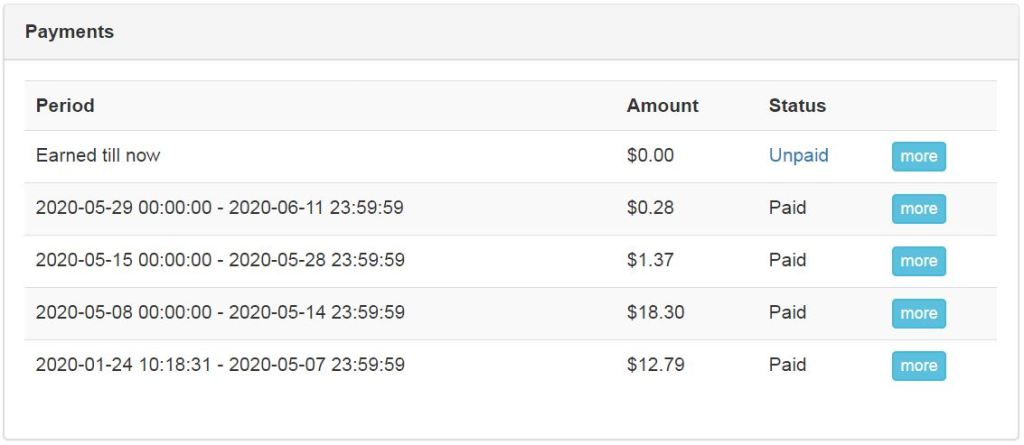
Suddenly, after months I received an email from info@gotranscript.com offering me a transcription work. I immediately visited their site and found available tasks in my language. There were a very simple built-in transcription tool and an intuitive interface for workers. I spent a couple of hours per day when new tasks were available. After a few days of work, I earned more than $30. The payment system is very convenient as it automatically transfers earned funds on your PayPal every Friday.
I can say that gotranscript platform is fully legit and recommend it to all transcription lovers. Here you can find proof of payments:














 remotejobs.business.blog