

How to Set Up a Winning Profile on Freelancer.com

Freelancer.com is one of the largest and most popular online platforms for freelancers and employers. With over 50 million users² and 6.7 million visits per month⁴, it offers a wide range of opportunities for freelancers to showcase their skills and find work.

But how do you stand out from the crowd and attract employers on Freelancer.com? How do you create a profile that showcases your expertise, experience, and personality? Here are some tips to help you set up a winning profile on Freelancer.com.

Choose a catchy username and headline

Your username and headline are the first things that employers see when they browse through freelancers’ profiles. They should be catchy, memorable, and relevant to your niche. Avoid using generic or random names that don’t reflect your skills or personality. For example, instead of “John123”, you could use “John_Web_Designer” or “John_Creative_Writer”. Similarly, instead of “I can do anything”, you could use “Professional Web Designer with 5 Years of Experience” or “Creative Writer with a Passion for Stories”.

Your username and headline should also include keywords that employers are likely to search for when looking for freelancers in your field. For example, if you are a web designer, you could use keywords like “web design”, “WordPress”, “HTML”, “CSS”, etc. This will help your profile rank higher in the search results and increase your visibility.

Write a compelling overview

Your overview is the main section of your profile where you can introduce yourself, highlight your skills, showcase your portfolio, and convince employers why they should hire you. It should be clear, concise, and persuasive. Here are some tips to write a compelling overview:

  • Start with a strong opening sentence that summarizes who you are and what you do. For example, “Hi, I’m John, a professional web designer with 5 years of experience in creating stunning websites for various clients.”
  • Use bullet points to list your skills and services. For example, “I can help you with: – Web design – WordPress development – HTML/CSS coding – Responsive design – SEO optimization”
  • Include relevant examples of your previous work or link to your portfolio. For example, “You can check out some of my recent projects here: [link to portfolio]”
  • End with a call to action that invites employers to contact you or invite you to bid on their projects. For example, “If you are looking for a web designer who can deliver high-quality work on time and on budget, look no further. Contact me today or invite me to bid on your project and let’s get started!”

Add relevant skills and certifications

Freelancer.com allows you to add up to 20 skills and certifications to your profile. These are important indicators of your expertise and credibility that employers look for when hiring freelancers. You should add skills and certifications that are relevant to your niche and that you can prove with evidence. For example, if you are a web designer, you could add skills like “Web Design”, “WordPress”, “HTML”, “CSS”, etc. and certifications like “Google Analytics”, “Adobe Photoshop”, etc.

To add skills and certifications to your profile, go to the Skills section and click on the Add button. You can then search for the skills or certifications that you want to add from the list or type them manually. You can also take skill tests on Freelancer.com to verify your skills and earn badges that will appear on your profile.

Update your profile regularly

One of the best ways to keep your profile fresh and attractive is to update it regularly. You should update your profile whenever you complete a new project, learn a new skill, earn a new certification, or receive a positive feedback from an employer. Updating your profile will show employers that you are active, professional, and constantly improving your skills.

You should also check your profile for any errors or outdated information that might hurt your reputation or credibility. For example, you should make sure that your contact details, availability, rates, and portfolio are accurate and up-to-date.

Conclusion

Freelancer.com is a great platform for freelancers who want to find work online and grow their careers. However, it is also a competitive marketplace where you need to stand out from the crowd and impress employers with your profile.

By following these tips, you can create a winning profile on Freelancer.com that showcases your skills, experience, personality, and value proposition. A winning profile will help you attract more employers, win more projects, earn more money, and achieve more success as a freelancer.

Source: Conversation with Bing, 5/18/2023
(1) Statistics Jobs for May 2023 | Freelancer. https://www.freelancer.com/jobs/Statistics/.
(2) 13 Liberating Freelancer.com Statistics for 2023 – WebTribunal. https://webtribunal.net/blog/freelancer-com-statistics/.
(3) 13 Liberating Freelancer.com Statistics for 2023 – WebTribunal. https://bing.com/search?q=freelancer.com+statistics.
(4) 405 Freelance Statistics for 2023: Market Size, Profile Data & Salary …. https://financesonline.com/freelance-statistics/.
(5) 104 Essential Freelance Stats 2023 [Facts and Trends] – ThriveMyWay. https://thrivemyway.com/freelance-stats/.

Appen: The Future of Work

Image credits to pixabay

Appen is a global leader in the data collection and labeling industry. The company provides high-quality data to a wide range of clients, including technology companies, research firms, and government agencies. Appen’s work helps to improve the accuracy and performance of artificial intelligence (AI) systems.

Appen offers a variety of freelance opportunities for people with a variety of skills. Some of the most common freelance roles at Appen include:

  • Data annotator: Data annotators review and label data for AI systems. This work can involve tasks such as identifying objects in images, transcribing audio, or translating text.
  • Research assistant: Research assistants help with a variety of research projects, such as collecting data, conducting surveys, and analyzing results.
  • Quality assurance (QA) tester: QA testers test AI systems to ensure that they are working properly. This work can involve tasks such as finding bugs, identifying usability issues, and reporting errors.

The average pay for freelancers at Appen varies depending on the role and the level of experience. However, most freelancers earn between $10 and $20 per hour.

To find freelance work at Appen, you can sign up for the company’s website. Once you have created an account, you can browse the available projects and apply for those that you are interested in. Appen will review your application and may invite you to complete a qualification test. If you pass the qualification test, you will be able to start working on projects.

Appen is a great way to earn money from home. The company offers a variety of freelance opportunities for people with a variety of skills. The pay is competitive, and the work is flexible. If you are looking for a way to make extra money, Appen is a great option.

Here are some additional tips for finding freelance work at Appen:

  • Make sure your profile is complete and up-to-date. This includes including your skills, experience, and education.
  • Use keywords in your profile and cover letter. This will help Appen find you when they are searching for freelancers.
  • Be responsive to messages and requests. Appen will often contact you to ask questions or to schedule interviews.
  • Be patient. It may take some time to find the right project. However, with a little effort, you can find freelance work at Appen that is both rewarding and profitable.

Here are some additional information about Appen:

  • Appen is a global company with offices in over 100 countries.
  • Appen has over 1 million contractors working on a variety of projects.
  • Appen works with a wide range of clients, including technology companies, research firms, and government agencies.
  • Appen is a great way to earn money from home and to gain experience in the data collection and labeling industry.

2captcha withdrawal ($2 via Bitcoin)

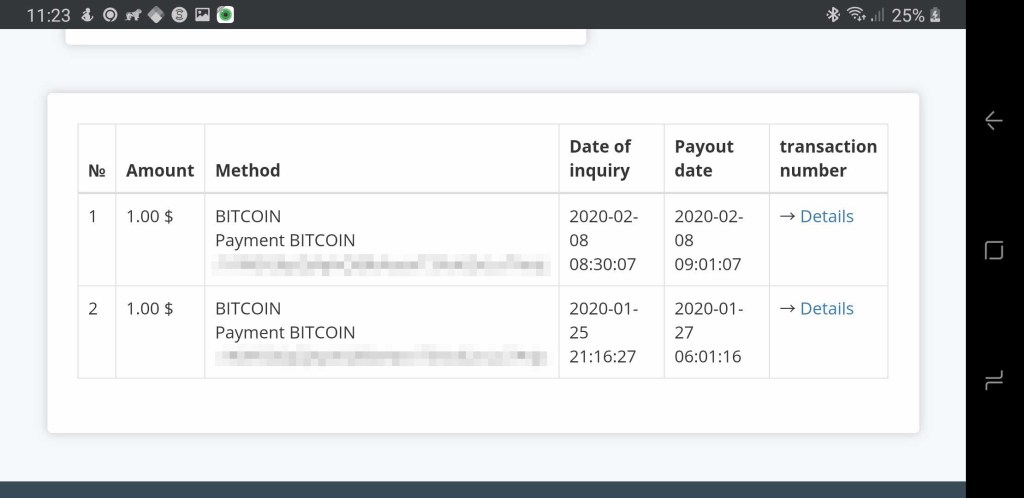
I have tested 2captcha’s withdrawal method via Bitcoin. For testing purposes solved about 2K recaptchas to earn $2. In the previous post, I wrote about the solving process and time. Now it’s time to grab hardly earned money. The minimum withdrawal limit for Bitcoin is $1 and I did two withdrawals as I earned $2.

You can register with this referral link and start earning immediately: 2captcha.com

The first withdrawal took 2-3 days to appear in the blockchain.com wallet. The second one was faster and it took a few hours. There were no fees for transactions and I got $2 Bitcoins. Now it’s $2.16 as Bitcoin price has increased.

As you can see it’s legit and fast. I didn’t try other methods yet but plan in the future so stay tuned.

Make $0.05 in 15 minutes with 2captcha

In my previous post First Impressions I wrote about 2captcha and put a referral link for new subscribers. Some people used this link, registered as my referrals and tried to earn money but it seems they were frustrated about the small amount of money they earned. I have good news for them, who owns an android smartphone. You can earn 3x time faster with your phone by solving “I’m not a robot” ReCaptchas, which pays $1 per 1000 tasks. For the normal captchas, the payment rate is dynamic (today it was $0.17 and $0,4 per 1000 in different periods) and it depends on the number of workers in a particular period. Recaptchas are 3x time better and easy. You don’t want to type hardly readable words and numbers, just click on images and that’s all. In this image you can compare prices of normal captchas and recaptchas.

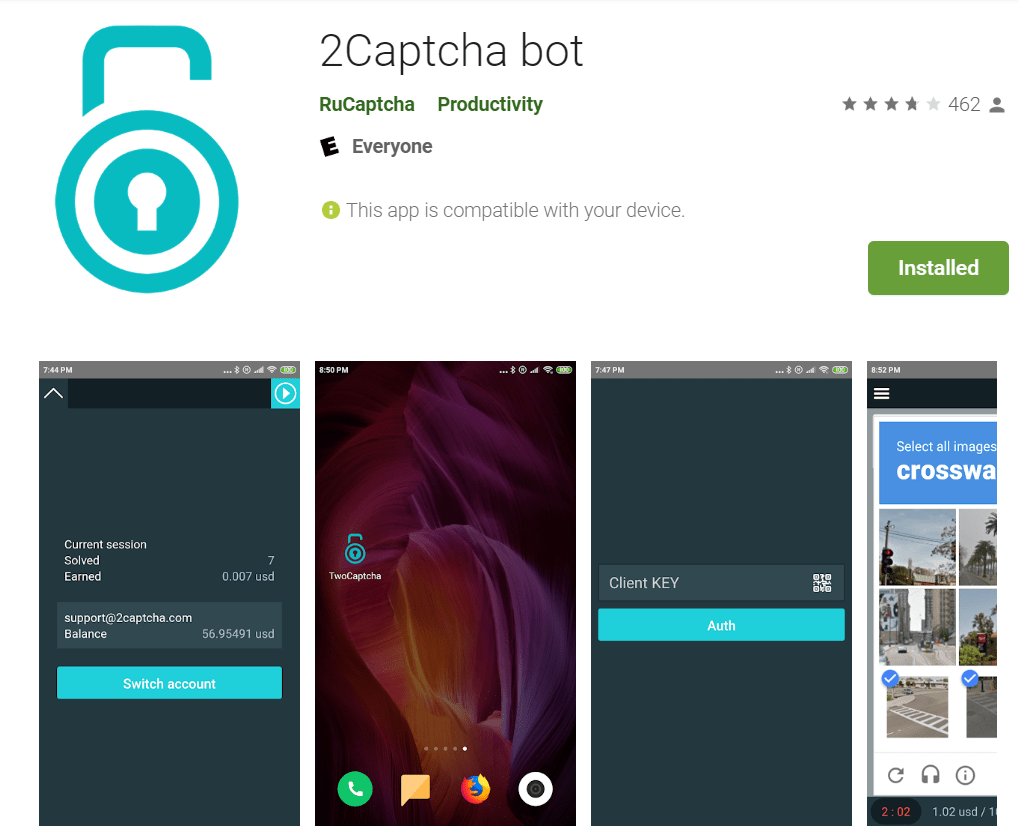
If you interested to make small but the easiest money, you should download 2Captcha bot from the play store and enter your Client Key from the 2captchas dashboard. You can find your key under the “Solve Captchas” tab.

I tested this app and it works like a charm. Please work very accurate and don’t make mistakes as it takes time to reenter captchas. You can find test results in my youtube video, which was uploaded especially for our blog readers. Of course, it’s up to you how fast you can solve captchas and earn as fast as you can.

Please like the video and Subscribe our channel for good news.

Wish you all the best and Find the right sources to make money remotely.

Microworkers withdrawal methods

It’s not a fairy tale to earn $10 on Microworkers. If you have time, laptop and internet, this is everything you need to start earning money. Your balance is growing slowly but it is growing hour by hour and day by day. If you are Microworkers member, you definitely know the minimum withdrawal limit is $9 + fees. So, your balance reached the golden $10 mark and… The next step is to grab your money and put it in your pocket, but here comes a question, which method do I have to use? Let’s go through this process together. We need to access the “withdraw” tab and place a new withdrawal request. The first step is to choose the withdrawal method. Microworkers has 3 withdrawal methods. For testing purposes, I tried all of them. Now I will share my experience and knowledge with Remotejobs readers. Below you can find the list of available methods with minimum limits and fees:

MethodMin LimitFee %Fee $$+Fee
 Moneybookers (Skrill) $       9.006.50% $       0.59 $       9.59
 Payoneer $     20.005.00% $       1.00 $     21.00
 Paypal $       9.007.50% $       0.68 $       9.68

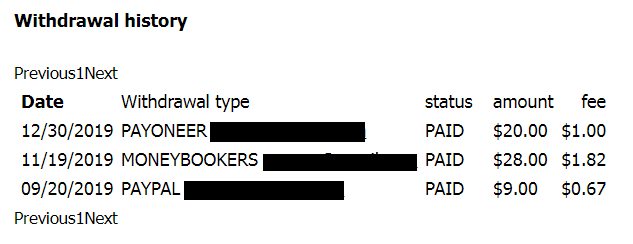
Here you can find my withdrawal proof:

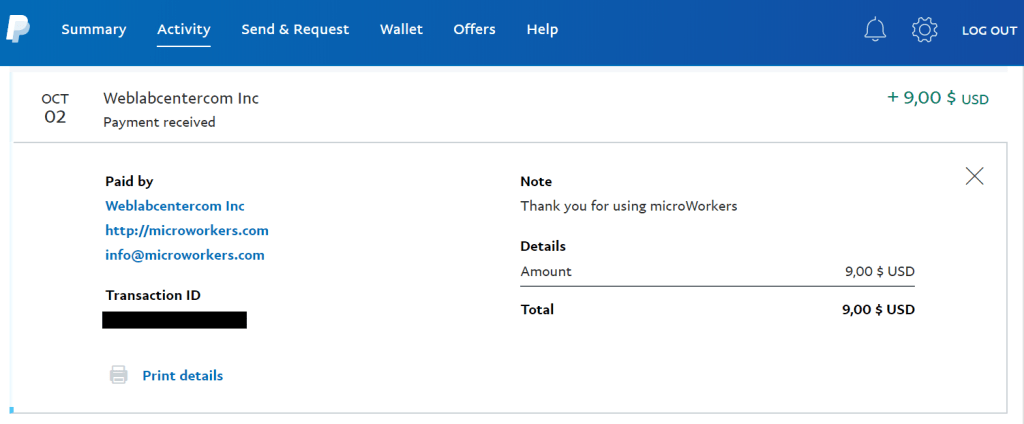
As you see, first was PayPal. I placed $9 request on 09/20/2019 and received it in 10/02/2019. This was my first withdrawal, so it was with a little delay. I think it’s normal for the first time.

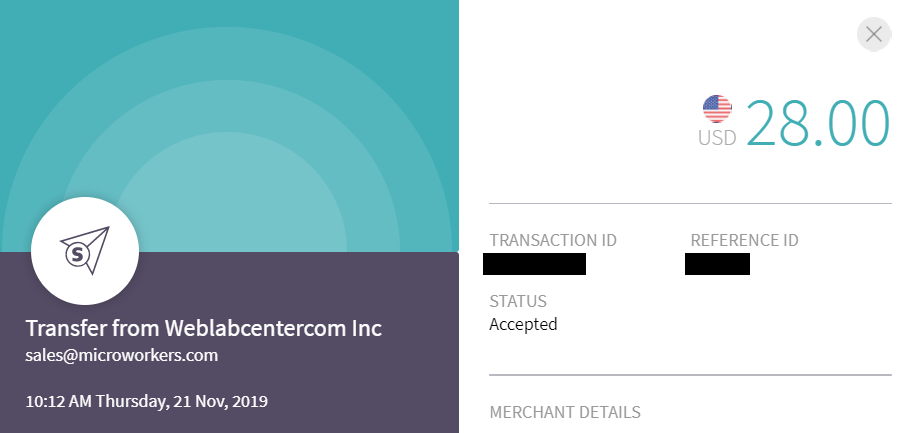
Second was Moneybookers (Skrill). I placed $28 (This is not minimal requirement, You can request $9) request on 11/19/2019 and received it in 11/21/2019.

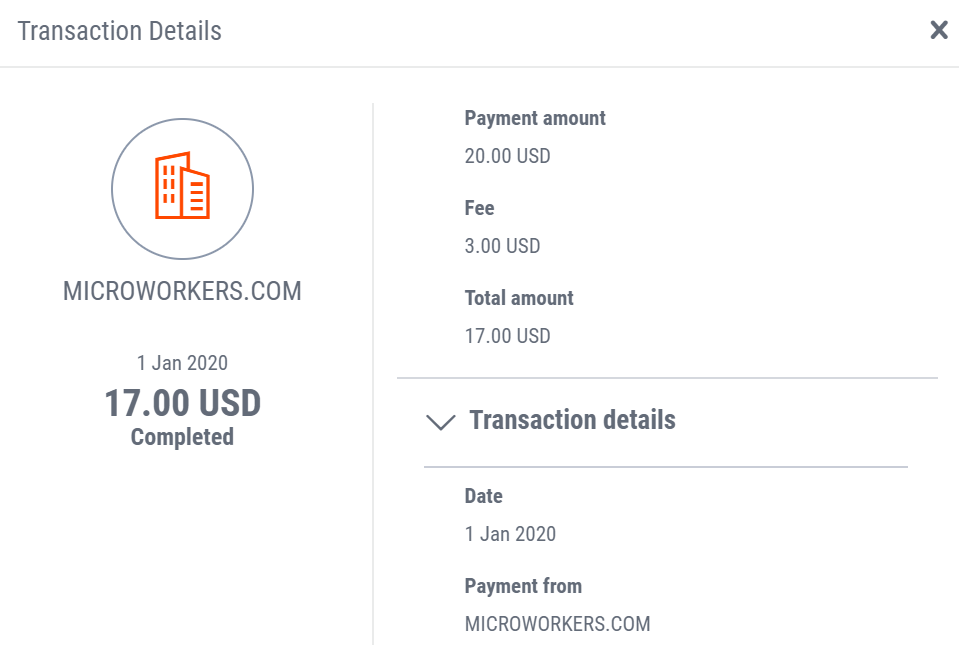
The last was Payoneer with it’s $20 limit. I placed $20 request on 12/30/2019 and received it in 01/01/2020. Wait, wait, wait $3 fee? Yes, I got $17 in my wallet.

I don’t want to judge any of these companies, I like all of them because they bring so sweet and happy messages when we are expecting. You know what I mean. So, this is just my research for our readers. Maybe it will help someone to make the right decision. Wish you all the best and Find the right sources to make money remotely.

P.S. to place a withdrawal request, required steps are: amount to withdraw, credentials and verification pin. This pin will be sent by Microworkers after our request from withdrawal wizard. We will get this pin by email.

All About Faucets

You couldn’t get rich. This is the first sentence which is coming to my mind when I am talking about faucets. No, they aren’t a scam. They are legit and real, but only if you are ready for cents and not dollars. I will share my couple years experience, and it’s up to you try or not.

CoinPot is the is the best micro wallet solution for faucets. It accepts five currencies and most of them are very popular. First of them is, of course, Bitcoin, then comes Bitcoin Cash, Litecoin, Dash and Doge. They have minimal withdrawal limits and pay directly to your crypto wallet as Blockchain, Coinbase and etc. I prefer Blockchain cause it allows me to trade and convert my currencies. In my country, Coinbase doesn’t allow us to convert and trade. To finalize CoinPot’s brief review, I’m registered from 2017 and use it from time to time. As a bonus when you claim from faucets, you receive Coinpot tokens and you can use them with a lottery, multiplier or simply convert them in cryptos. 

It takes about 3 minutes to claim from 7 free faucets. I will take simple video with clams and upload later.

  • Bitfun – pays every 5 minutes 1 faucet (you can claim every hour about 10 faucets)
  • Bonus Bitcoin – pays 8 satoshis every 15 minutes (you have to change your claim settings to average)
  • Moon bitcoin – pays every 5 minutes 1 faucet (you can claim every hour about 10 faucets)
  • Moon Bitcoin Cash – pays every 5 minutes 1 faucet (you can claim every hour about 10 faucets)
  • Moon Litecoin – pays every 5 minutes 1 faucet (you can claim every hour about 10 faucets)
  • Moon Doge – pays every 5 minutes 1 faucet (you can claim every hour about 10 faucets)
  • Moon Dash – pays every 5 minutes 1 faucet (you can claim every hour about 10 faucets)

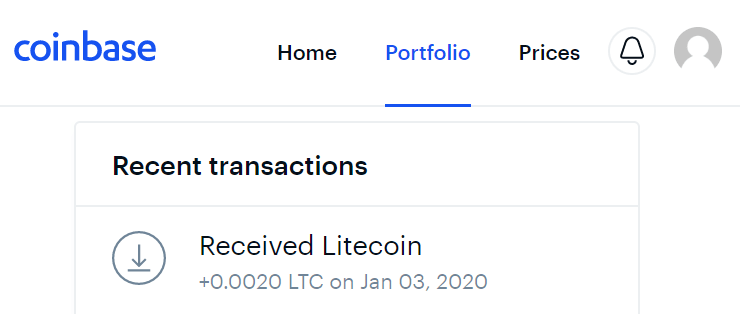
When you collect your faucets, you can convert them to one currency and can withdraw your coins when reach minimum withdrawal amount. For Litecoin it’s 0.002 ($0.07 for the date this post was released) Here is my latest transaction. I used Coinbase cause Blockchain doesn’t have Litecoin, but it’s perfect for Bitcoin Cash.

P.S. One of the good combination of faucets which isn’t related to CoinPot, but is legit as well is FreeBitcoin – pays hourly. Amount of faucets is depended on Bitcoin Price. Today’s rate per claim is 0.00000023 BTC (23 faucets) When Bitcoin’s price increases claim rate decreases.

info: some links have referrals.